Breaking News
Loading...
  • New Movies
  • Recent Games
  • Tech Review

Tab 1 Top Area

Tech News

Game Reviews

Recent Post

Showing posts with label Burrows Apps. Show all posts
Saturday, December 27, 2014
Friday, December 26, 2014
Wednesday, June 25, 2014
Sunday, June 15, 2014
Friday, May 23, 2014
Wednesday, May 21, 2014
Friday, May 16, 2014
Wednesday, May 14, 2014
Friday, April 18, 2014
Sunday, March 23, 2014
Monday, March 17, 2014
Root Checker Pro v3.66

Root Checker Pro v3.66

Root Checker Pro v3.66

Paid Application Added Date: December 16 2014
Requires Android: 2.3 and upDeveloper: Burrows Apps
Size: 1.5MCategory: Tools
Version: 3.66Version history: Root Checker Pro

Screenshot Root Checker Pro v3.66

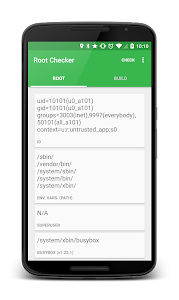
"This application Root Checker will allow the user to confirm they have proper root ( superuser ) access configured and operational. **** DISCLAIMER: THIS APPLICATION WILL NOT ROOT THE DEVICE **** *Feel free to email me with any questions. I always reply!* The goal of this application is to provide even the newest Android user with a simple method to check their device for root (administrator/superuser) access. This is a very simple application to notify the user whether or not they have properly setup root access. This application will test the device for root access using a very simple quick and reliable method. The su binary is the most common binary used on Android devices to grant and manage root access. Root Checker will check and verify that the su binary is located in a standard location on the device. Root Checker will also confirm the proper permissions and flags on the su binary in addition to testing that access is granted by the su binary. Many times users experience issues along the path of installing configuring and gaining root access. For some users the process can seem complex while for others the process can seem simple. Regardless of the user"s technical skill set Root Checker will quickly and correctly verify whether or not root access is 100% functioning. The process of confirming root access is sometimes known by other terms such as gaining superuser access or gaining administrator access. Root Checker covers all these terms as they relate to one core function being able to execute commands with root access. If the Superuser or SuperSU applications are installed and working properly these applications will prompt the user to accept or deny the root access request from Root Checker. Accepting the request will allow Root Checker to check for root access. Denying the request will result in Root Checker reporting no root access. Gaining root access varies based on manufacturer model and carrier. If you"re searching for root access to your device this application will not help you. If you"re interested in rooting your device please use http://www.google.com to find the appropriate rooting support areas for your specific device. Other popular web sites which provide rooting guides are http://forum.xda-developers.com and http://forum.sdx-developers.com. Please don"t leave negative feedback about a concern bug or issue! Instead please email mewith your feedback suggestions and comments! I do my best to assist as many people as possible and appreciate all the support that has made this application successful! Thank you! Features: - Detects if your phone has Root access - Device and Android Version along with the API Level - Displays SuperUser Version - Displays BusyBox and Su Versions - User and Group Id - SuperUser Location - Su and Sudo Location - Environment Variables - Displays Phone"s Build Information Permissions requested: - Internet - Google Analytics/Send Feedback - SuperUser - Check for Root access Root Checker by Jared Burrows Visit: http://www.burrowsapps.com/ Find me on Google+: https://plus.google.com/+JaredBurrows Send all suggestions to [email protected]"

Download APK From Server 01Download APK From Server 02
Get it on Google Play
BusyBox Install Pro (No Root) v3.47

BusyBox Install Pro (No Root) v3.47

BusyBox Install Pro (No Root) v3.47

Paid Application Added Date: December 16 2014
Requires Android: 2.3 and upDeveloper: Burrows Apps
Size: 1.5MCategory: Tools
Version: 3.47Version history: BusyBox Install Pro (No Root)

Screenshot BusyBox Install Pro (No Root) v3.47

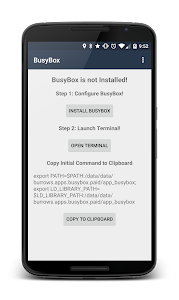
"BusyBox for Non-Rooted devices adds the power of BusyBox to your phone without Root! How to use BusyBox Non-Root: - Step 1: Click on "Install" button to download BusyBox! - Step 2: Click on "Open Terminal" button! - Step 3: Paste the command you have already copied in Step 2 in the Terminal! RUN THIS APPLICATION BEFORE THE TERMINAL EMULATOR Required: - Android Terminal Emulator Application Add PATH to Emulator: - In Terminal Emulator --Preferences --Initial command: "export PATH=$PATH:/data/data/burrows.apps.busybox.paid/app_busybox/; export LD_LIBRARY_PATH=$LD_LIBRARY_PATH:/data/data/burrows.apps.busybox.paid/app_busybox/" BusyBox combines tiny versions of many common UNIX utilities into a single small executable. It provides replacements for most of the utilities you usually find in GNU fileutils shellutils etc. BusyBox is maintained by Denys Vlasenko and licensed under the GNU GENERAL PUBLIC LICENSE version 2. Provided extra Binaries: bash rsync scp sqlite3 sshwget and more! Permissions requested: - Internet: Download BusyBox binaries - Script: Add $PATH to Terminal BusyBox for Non-Rooted Devices by Jared Burrows Visit: http://www.burrowsapps.com/ Find me on Google+: https://plus.google.com/+JaredBurrows Send all suggestions to [email protected]"

Download APK From Server 01Download APK From Server 02
Get it on Google Play
Wednesday, March 12, 2014
BusyBox Install Pro (No Root) v3.45

BusyBox Install Pro (No Root) v3.45

BusyBox Install Pro (No Root) v3.45

Paid Application Added Date: December 13 2014
Requires Android: 2.3 and upDeveloper: Burrows Apps
Size: 1.5MCategory: Tools
Version: 3.45Version history: BusyBox Install Pro (No Root)

Screenshot BusyBox Install Pro (No Root) v3.45

"BusyBox for Non-Rooted devices adds the power of BusyBox to your phone without Root! How to use BusyBox Non-Root: - Step 1: Click on "Install" button to download BusyBox! - Step 2: Click on "Open Terminal" button! - Step 3: Paste the command you have already copied in Step 2 in the Terminal! RUN THIS APPLICATION BEFORE THE TERMINAL EMULATOR Required: - Android Terminal Emulator Application Add PATH to Emulator: - In Terminal Emulator --Preferences --Initial command: "export PATH=$PATH:/data/data/burrows.apps.busybox.paid/app_busybox/; export LD_LIBRARY_PATH=$LD_LIBRARY_PATH:/data/data/burrows.apps.busybox.paid/app_busybox/" BusyBox combines tiny versions of many common UNIX utilities into a single small executable. It provides replacements for most of the utilities you usually find in GNU fileutils shellutils etc. BusyBox is maintained by Denys Vlasenko and licensed under the GNU GENERAL PUBLIC LICENSE version 2. Provided extra Binaries: bash rsync scp sqlite3 sshwget and more! Permissions requested: - Internet: Download BusyBox binaries - Script: Add $PATH to Terminal BusyBox for Non-Rooted Devices by Jared Burrows Visit: http://www.burrowsapps.com/ Find me on Google+: https://plus.google.com/+JaredBurrows Send all suggestions to [email protected]"

Download APK From Server 01Download APK From Server 02
Get it on Google Play
Tuesday, March 11, 2014
Root Checker Pro v3.64

Root Checker Pro v3.64

Root Checker Pro v3.64

Paid Application Added Date: December 13 2014
Requires Android: 2.3 and upDeveloper: Burrows Apps
Size: 1.5MCategory: Tools
Version: 3.64Version history: Root Checker Pro

Screenshot Root Checker Pro v3.64

"This application Root Checker will allow the user to confirm they have proper root ( superuser ) access configured and operational. **** DISCLAIMER: THIS APPLICATION WILL NOT ROOT THE DEVICE **** *Feel free to email me with any questions. I always reply!* The goal of this application is to provide even the newest Android user with a simple method to check their device for root (administrator/superuser) access. This is a very simple application to notify the user whether or not they have properly setup root access. This application will test the device for root access using a very simple quick and reliable method. The su binary is the most common binary used on Android devices to grant and manage root access. Root Checker will check and verify that the su binary is located in a standard location on the device. Root Checker will also confirm the proper permissions and flags on the su binary in addition to testing that access is granted by the su binary. Many times users experience issues along the path of installing configuring and gaining root access. For some users the process can seem complex while for others the process can seem simple. Regardless of the user"s technical skill set Root Checker will quickly and correctly verify whether or not root access is 100% functioning. The process of confirming root access is sometimes known by other terms such as gaining superuser access or gaining administrator access. Root Checker covers all these terms as they relate to one core function being able to execute commands with root access. If the Superuser or SuperSU applications are installed and working properly these applications will prompt the user to accept or deny the root access request from Root Checker. Accepting the request will allow Root Checker to check for root access. Denying the request will result in Root Checker reporting no root access. Gaining root access varies based on manufacturer model and carrier. If you"re searching for root access to your device this application will not help you. If you"re interested in rooting your device please use http://www.google.com to find the appropriate rooting support areas for your specific device. Other popular web sites which provide rooting guides are http://forum.xda-developers.com and http://forum.sdx-developers.com. Please don"t leave negative feedback about a concern bug or issue! Instead please email mewith your feedback suggestions and comments! I do my best to assist as many people as possible and appreciate all the support that has made this application successful! Thank you! Features: - Detects if your phone has Root access - Device and Android Version along with the API Level - Displays SuperUser Version - Displays BusyBox and Su Versions - User and Group Id - SuperUser Location - Su and Sudo Location - Environment Variables - Displays Phone"s Build Information Permissions requested: - Internet - Google Analytics/Send Feedback - SuperUser - Check for Root access Root Checker by Jared Burrows Visit: http://www.burrowsapps.com/ Find me on Google+: https://plus.google.com/+JaredBurrows Send all suggestions to [email protected]"

Download APK From Server 01Download APK From Server 02
Get it on Google Play
Tuesday, March 4, 2014
Root Checker Pro v3.63

Root Checker Pro v3.63

Root Checker Pro v3.63

Paid Application Added Date: December 08 2014
Requires Android: 2.3 and upDeveloper: Burrows Apps
Size: 1.5MCategory: Tools
Version: 3.63Version history: Root Checker Pro

Screenshot Root Checker Pro v3.63

"This application Root Checker will allow the user to confirm they have proper root ( superuser ) access configured and operational. **** DISCLAIMER: THIS APPLICATION WILL NOT ROOT THE DEVICE **** *Feel free to email me with any questions. I always reply!* The goal of this application is to provide even the newest Android user with a simple method to check their device for root (administrator/superuser) access. This is a very simple application to notify the user whether or not they have properly setup root access. This application will test the device for root access using a very simple quick and reliable method. The su binary is the most common binary used on Android devices to grant and manage root access. Root Checker will check and verify that the su binary is located in a standard location on the device. Root Checker will also confirm the proper permissions and flags on the su binary in addition to testing that access is granted by the su binary. Many times users experience issues along the path of installing configuring and gaining root access. For some users the process can seem complex while for others the process can seem simple. Regardless of the user"s technical skill set Root Checker will quickly and correctly verify whether or not root access is 100% functioning. The process of confirming root access is sometimes known by other terms such as gaining superuser access or gaining administrator access. Root Checker covers all these terms as they relate to one core function being able to execute commands with root access. If the Superuser or SuperSU applications are installed and working properly these applications will prompt the user to accept or deny the root access request from Root Checker. Accepting the request will allow Root Checker to check for root access. Denying the request will result in Root Checker reporting no root access. Gaining root access varies based on manufacturer model and carrier. If you"re searching for root access to your device this application will not help you. If you"re interested in rooting your device please use http://www.google.com to find the appropriate rooting support areas for your specific device. Other popular web sites which provide rooting guides are http://forum.xda-developers.com and http://forum.sdx-developers.com. Please don"t leave negative feedback about a concern bug or issue! Instead please email mewith your feedback suggestions and comments! I do my best to assist as many people as possible and appreciate all the support that has made this application successful! Thank you! Features: - Detects if your phone has Root access - Device and Android Version along with the API Level - Displays SuperUser Version - Displays BusyBox and Su Versions - User and Group Id - SuperUser Location - Su and Sudo Location - Environment Variables - Displays Phone"s Build Information Permissions requested: - Internet - Google Analytics/Send Feedback - SuperUser - Check for Root access Root Checker by Jared Burrows Visit: http://www.burrowsapps.com/ Find me on Google+: https://plus.google.com/+JaredBurrows Send all suggestions to [email protected]"

Download APK From Server 01Download APK From Server 02
Get it on Google Play
Copyright © 2012 Android Stock APK All Right Reserved
Designed by CBTblogger